Author Archives: jkl

webview开发环境搭建

本来,手机客户端webview的开发环境与普通web开发的区别并不大,无非是浏览器不同而已,但为了能够像用firebug一样,用客户端查看webview页面时,能时时的看到网络请求,并且,在不换客户端的情况下,可以让客户端连接本地开发服务器,无疑将对开发过程有很大帮助。

1. 让客户端链接本地服务,在mac环境下,还是比较简单的:

首先,Airport改为internet共享模式,然后让手机的wifi链接你的Airport,这样,手机所有的网络请求都要经过你的mac才能出去。然后再通过修改hosts,讲客户端webview的请求转到别的服务器,比如本地开发环境上。具体的做法如下:

1). 先关闭Airport,打开 系统偏好设置–》共享–》internet共享,在右侧选择“Airport”,在弹出框中输入网络名称、密码,再选中左侧的“internet共享”~~~mac端设置完毕

2). 打开手机(iphone)wifi设置,选择你刚才共享的网络

3). 修改mac的hosts。比如你以太网的ip是 192.168.1.1,客户端webview的访问的域名是 webview.test.com,修改hosts,添加一行“192.168.1.1  webview.test.com”,注意,不是localhost

over~~~这一条,可是我独创的呀

2. 像firebug一样监控手机的网络请求

1). 在上面前两步的基础上,还需要一个工具:paros。paros的官网已经被墙了,但可以点这里下载,下载paros-3.2.13-unix.zip,解压,执行里面的sh,可以看到它的界面,在tools–》options中选择local proxy,在Address 中输入AirPort的ip地址,输入端口8080。此时AirPort的ip地址,可以在mac的 系统偏好设置–》网络 中找到,比如: “AirPort”有自分配的 IP 地址“169.214.26.22”

2).  打开手机的wifi设置,选择Airport,选择“手动”,在服务器和端口中,输入你前一步的ip和端口

ok,经过这些设置,你口可以在paros中监控手机的所有网络请求了啦~~

windows的用户要看是否可以将无线网络改为internet共享,否则,上面的两条都做不到

——–

参考:http://www.cnblogs.com/ydhliphonedev/archive/2011/10/27/2226935.html

[转]Mongo db 与mysql 语法比较

mongodb与mysql命令对比

传统的关系数据库一般由数据库(database)、表(table)、记录(record)三个层次概念组成,MongoDB是由数据库(database)、集合(collection)、文档对象(document)三个层次组成。MongoDB对于关系型数据库里的表,但是集合中没有列、行和关系概念,这体现了模式自由的特点。

MySQL

MongoDB

说明

mysqld mongod 服务器守护进程
mysql mongo 客户端工具
mysqldump mongodump 逻辑备份工具
mysql mongorestore 逻辑恢复工具
db.repairDatabase() 修复数据库
mysqldump mongoexport 数据导出工具
source mongoimport 数据导入工具
grant * privileges on *.* to … Db.addUser()Db.auth() 新建用户并权限
show databases show dbs 显示库列表
Show tables Show collections 显示表列表
Show slave status Rs.status 查询主从状态
Create table users(a int, b int) db.createCollection(“mycoll”, {capped:true,size:100000}) 另:可隐式创建表。 创建表
Create INDEX idxname ON users(name) db.users.ensureIndex({name:1}) 创建索引
Create INDEX idxname ON users(name,ts DESC) db.users.ensureIndex({name:1,ts:-1}) 创建索引
Insert into users values(1, 1) db.users.insert({a:1, b:1}) 插入记录
Select a, b from users db.users.find({},{a:1, b:1}) 查询表
Select * from users db.users.find() 查询表
Select * from users where age=33 db.users.find({age:33}) 条件查询
Select a, b from users where age=33 db.users.find({age:33},{a:1, b:1}) 条件查询
select * from users where age<33 db.users.find({‘age’:{$lt:33}}) 条件查询
select * from users where age>33 and age<=40 db.users.find({‘age’:{$gt:33,$lte:40}}) 条件查询
select * from users where a=1 and b=’q’ db.users.find({a:1,b:’q’}) 条件查询
select * from users where a=1 or b=2 db.users.find( { $or : [ { a : 1 } , { b : 2 } ] } ) 条件查询
select * from users limit 1 db.users.findOne() 条件查询
select * from users where name like “%Joe%” db.users.find({name:/Joe/}) 模糊查询
select * from users where name like “Joe%” db.users.find({name:/^Joe/}) 模糊查询
select count(1) from users Db.users.count() 获取表记录数
select count(1) from users where age>30 db.users.find({age: {‘$gt’: 30}}).count() 获取表记录数
select DISTINCT last_name from users db.users.distinct(‘last_name’) 去掉重复值
select * from users ORDER BY name db.users.find().sort({name:-1}) 排序
select * from users ORDER BY name DESC db.users.find().sort({name:-1}) 排序
EXPLAIN select * from users where z=3 db.users.find({z:3}).explain() 获取存储路径
update users set a=1 where b=’q’ db.users.update({b:’q’}, {$set:{a:1}}, false, true) 更新记录
update users set a=a+2 where b=’q’ db.users.update({b:’q’}, {$inc:{a:2}}, false, true) 更新记录
delete from users where z=”abc” db.users.remove({z:’abc’}) 删除记录
db. users.remove() 删除所有的记录
drop database IF EXISTS test; use testdb.dropDatabase() 删除数据库
drop table IF EXISTS test; db.mytable.drop() 删除表/collection
db.addUser(‘test’, ’test’) 添加用户readOnly–>false
db.addUser(‘test’, ’test’, true) 添加用户readOnly–>true
db.addUser(“test”,”test222″) 更改密码
db.system.users.remove({user:”test”})或者db.removeUser(‘test’) 删除用户
use admin 超级用户
db.auth(‘test’, ‘test’) 用户授权
db.system.users.find() 查看用户列表
show users 查看所有用户
db.printCollectionStats() 查看各collection的状态
db.printReplicationInfo() 查看主从复制状态
show profile 查看profiling
db.copyDatabase(‘mail_addr’,’mail_addr_tmp’) 拷贝数据库
db.users.dataSize() 查看collection数据的大小
db. users.totalIndexSize() 查询索引的大小

mongodb语法

MongoDB的好处挺多的,比如多列索引,查询时可以用一些统计函数,支持多条件查询,但是目前多表查询是不支持的,可以想办法通过数据冗余来解决多表查询的问题。

MongoDB对数据的操作很丰富,下面做一些举例说明,内容大部分来自官方文档,另外有部分为自己理解。


查询colls所有数据

db.colls.find() //select * from colls

通过指定条件查询

db.colls.find({‘last_name’: ‘Smith’});//select * from colls where last_name=’Smith’

指定多条件查询

db.colls.find( { x : 3, y : “foo” } );//select * from colls where x=3 and y=’foo’


指定条件范围查询

db.colls.find({j: {$ne: 3}, k: {$gt: 10} });//select * from colls where j!=3 and k>10


查询不包括某内容

db.colls.find({}, {a:0});//查询除a为0外的所有数据


支持<, <=, >, >=查询,需用符号替代分别为$lt,$lte,$gt,$gte

db.colls.find({ “field” : { $gt: value } } );

db.colls.find({ “field” : { $lt: value } } );

db.colls.find({ “field” : { $gte: value } } );

db.colls.find({ “field” : { $lte: value } } );


也可对某一字段做范围查询

db.colls.find({ “field” : { $gt: value1, $lt: value2 } } );


不等于查询用字符$ne

db.colls.find( { x : { $ne : 3 } } );


in查询用字符$in

db.colls.find( { “field” : { $in : array } } );

db.colls.find({j:{$in: [2,4,6]}});


not in查询用字符$nin

db.colls.find({j:{$nin: [2,4,6]}});

取模查询用字符$mod

db.colls.find( { a : { $mod : [ 10 , 1 ] } } )// where a % 10 == 1

$all查询

db.colls.find( { a: { $all: [ 2, 3 ] } } );//指定a满足数组中任意值时

$size查询

db.colls.find( { a : { $size: 1 } } );//对对象的数量查询,此查询查询a的子对象数目为1的记录

$exists查询

db.colls.find( { a : { $exists : true } } ); // 存在a对象的数据

db.colls.find( { a : { $exists : false } } ); // 不存在a对象的数据

$type查询$type值为bsonhttp://bsonspec.org/数 据的类型值

db.colls.find( { a : { $type : 2 } } ); // 匹配a为string类型数据

db.colls.find( { a : { $type : 16 } } ); // 匹配a为int类型数据

使用正则表达式匹配

db.colls.find( { name : /acme.*corp/i } );//类似于SQL中like

内嵌对象查询

db.colls.find( { “author.name” : “joe” } );

1.3.3版本及更高版本包含$not查询

db.colls.find( { name : { $not : /acme.*corp/i } } );

db.colls.find( { a : { $not : { $mod : [ 10 , 1 ] } } } );

sort()排序

db.colls.find().sort( { ts : -1 } );//1为升序2为降序

limit()对限制查询数据返回个数

db.colls.find().limit(10)

skip()跳过某些数据

db.colls.find().skip(10)

snapshot()快照保证没有重复数据返回或对象丢失

count()统计查询对象个数

db.students.find({‘address.state’ : ‘CA’}).count();//效率较高

db.students.find({‘address.state’ : ‘CA’}).toArray().length;//效率很低

group()对查询结果分组和SQL中group by函数类似

distinct()返回不重复值

——-

转自:http://www.cnblogs.com/xffy1028/archive/2011/12/03/2272837.html



[转]phpize的安装

一直想装VLD却一直没装上,因为需要用到phpize,但这个工具大部分机子都没有装,上网搜了一下大部分都是讲phpize的应用没有讲怎么安装。

今天终于搜到了,不过是要在linux机器上,有yum命令就行。phpize是属于php-devel的内容,所以只要运行

yum install php-devel就行。
————
转自:http://hi.baidu.com/esky9/blog/item/4f643c273c18430e908f9d2a.html

书签里的js

如要你要去现在很流行的花瓣网去注册,会发现其中有一步,是让你将它的一个“采集到花瓣”的链接添加到你浏览器的书签里。当你使用这个浏览器再浏览其他网页时,点这个书签,就会弹出花瓣网采集该网页图片的界面~~
这是一个很nice的功能,已经有点类似客户端了,把这个书签里的“链接”拿出来,整理一下:

function(d,a,c,b){
	//首先检查document里面是否有'__huaban',如果没有,就去加载一段自己的js
	if(a[c] && typeof a[c].showValidImages=='function'){
		a[c].showValidImages()
	}else{
		b=a.createElement('script');
		b.id='huaban_script';
		b.setAttribute('charset','utf-8');
		b.src='http://huaban.com/js/pinmarklet.js?'+Math.floor(new Date());
		a.body.appendChild(b);
	}
}(window,document,'__huaban'));

对,这段代码就是取加载一段花瓣网自己的js~~~~~~ 😈 😈 在别人的页面上注入一段自己的代码,然后它就可以为所欲为了:除了抓图片,抓视频,还可以取cookie,修改页面css等等
除了书签外,还可以直接在地址栏执行js的逻辑,比如:javascript:alert(document.title);
其实,把js放在书签里,只是浏览器地址栏执行js的一种表现而已

[转]手机前端之jquery Mobile学习——swipe

这是经常会在Android手机上出现的一个动作,那就是手指划过屏幕的时候执行动作。
手机上使用到的事件,可以使用live()和bind()来绑定。
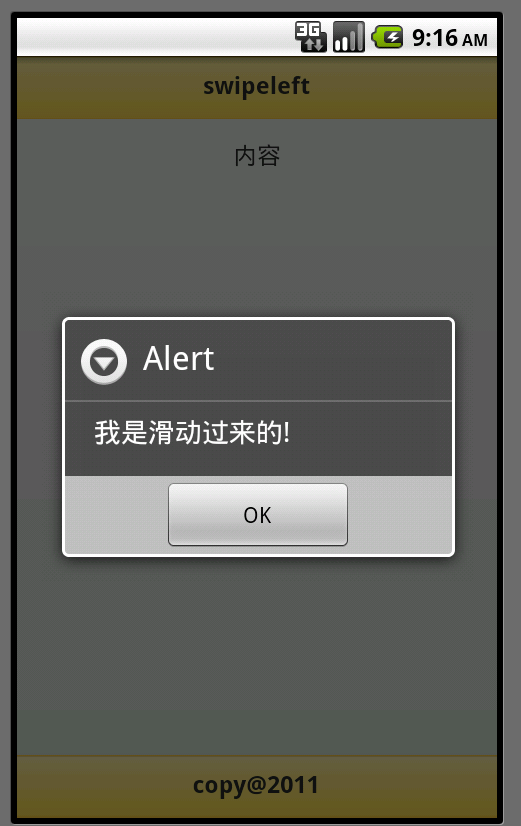
swipe 在一秒钟的间隔内水平方向上拖动30px以上会触发该事件,(水平方向上拖动要保持在20px以内,否则不会触发).
swipeleft 在左边方向移动时触发该事件.
swiperight 在右边方向移动时触发该事件.
下面的代码以swipeleft为例:

<!DOCTYPE html>
<html>
<head>
<meta charset="utf-8">
<title>jQuery Mobile Web 应用程序</title>
<link href="http://code.jquery.com/mobile/1.0.1/jquery.mobile-1.0.1.min.css" rel="stylesheet" type="text/css"/>
<script src="http://code.jquery.com/jquery-1.6.4.min.js" type="text/javascript"></script>
<script src="http://code.jquery.com/mobile/1.0.1/jquery.mobile-1.0.1.min.js" type="text/javascript"></script>
<script src="/phonegap.js" type="text/javascript"></script>
    <script>
    $(document).ready(function() {
        $("#home").live("swipeleft",function(){
            alert("我是滑动过来的!");          
        });
 
     });
    </script>
</head>
<body>
<div data-role="page" id="home">
<div data-role="header" data-theme="e" data-position="inline"><h1>swipeleft</h1></div>
<div data-role="content" style="text-align:center" >内容</div>
</body>
</html>

在Android模拟器上鼠标迅速向左滑动,则触发事件。

——转自:http://archive.cnblogs.com/a/2232011/
ps:不仅Android,ios也可以这么玩

[转]php Output Buffer(输出缓冲)函数的妙用

在PHP编程中, 我们经常会遇到一些直接产生输出的函数, 如passthru(),readfile(), var_dump() 等. 但有时我们想把这些函数的输出导入到文件中,或者先经过处理再输出, 或者把这些函数的输出作为字符串来处理.

这时我们就要用到 Output Buffer(输出缓冲) 函数了.

处理输出缓冲的函数主要有这么几个:

ob_start();  //开始输出缓冲, 这时PHP停止输出, 在这以后的输出都被转到一个内部的缓冲里. 
 
ob_get_contents();  //这个函数返回内部缓冲的内容. 这就等于把这些输出都变成了字符串. 
 
ob_get_ length();  //返回内部缓冲的长度. 
 
ob_end_flush();  //结束输出缓冲, 并输出缓冲里的内容. 在这以后的输出都是正常输出. 
 
ob_end_clean();  //结束输出缓冲, 并扔掉缓冲里的内容.

举个例子, var_dump()函数输出一个变量的结构和内容, 这在调试的时候很有用.

但如果变量的内容里有 $#@60; , $#@62; 等HTML的特殊字符, 输出到网页里就看不见了. 怎么办呢?

用输出缓冲函数能很容易的解决这个问题.

ob_start();
 
var_dump($var); 
 
$out = ob_get_contents(); 
 
ob_end_clean();

这时var_dump()的输出已经存在 $out 里了. 你可以现在就输出:

echo "$#@60;pre$#@62;" . htmlspecialchars($out) . "$#@60;/pre$#@62;" ;

或者等到将来, 再或者把这个字符串送到模板(Template)里再输出.
———
转自:http://www.2008php.com/news_tx.php?ID=5146&News_topy=3

stop!

jquery的animate方法可以创建各种炫酷的动画效果,但是,有些时候,我们却需要停止正在运行的动画,此时,就需要用到stop方法,使用方法非常简单,以下是jquery官方文档中的内容:

/* Start animation */
$("#go").click(function(){
  $(".block").animate({left: '+=100px'}, 2000);
});
/* Stop animation when button is clicked */
$("#stop").click(function(){
  $(".block").stop();
});

即要停止谁的动画就让谁“stop”,而不用取区分具体正在运行的是什么动画

[转] div模拟textarea

使用很简单,一个普通的block元素上加个contenteditable=”true”就ok了,如下:

<div contenteditable="true"></div>

true外面的引号甚至去掉都没关系。

contenteditable属性虽是HTML5里面的内容,但是IE似乎老早就支持此标签属性了。所以,兼容性方面还是不用太担心的。

ok,最麻烦的模拟textarea的可编辑效果已经解决了,现在想要使用div实现高度自适应那就像是给花花草草松松土一样容易的。使用min- height属性基本上就一步到位了,考虑到IE6浏览器对min/max家族不屑一顾,结合其内部元素溢出会撑开父标签高宽的特性,IE6浏览器直接定 高就可以了。

CSS代码:

.test_box {
    width: 400px; 
    min-height: 120px; 
    max-height: 300px;
    _height: 120px; 
    margin-left: auto; 
    margin-right: auto; 
    padding: 3px; 
    outline: 0; 
    border: 1px solid #a0b3d6; 
    font-size: 12px; 
    word-wrap: break-word;
    overflow-x: hidden;
    overflow-y: auto;
}

HTML代码:

<div class="test_box" contenteditable="true"><br /></div>

——-
转自:http://blog.163.com/xiangfei209@126/blog/static/9869567420113154453944/

wordpress表情集

:mrgreen:(:mrgreen :) :neutral:(:neutral :) :twisted:(:twisted : )
:arrow:(:arrow :) :shock:(:shock :) :smile:(:smile :)
:???:(:??? :) :cool:(:cool :) :evil:(:evil :)
:grin:(:grin :) :idea:(:idea :) :oops:(:oops :)
:razz:(:razz :) :roll:(:roll :) :wink:(:wink :)
:cry:(:cry :) :eek:(:eek :) :lol:(:lol :)
:mad:(:mad :) :sad:(:sad :) 😎 (8- ))
😯 (8-O) 🙁 (:- () 🙂 (:- ))
:-?(:- ?) :-D(:- D) :-P(:- P)
:-o(:- o) :-x(:- x) :-|(:- |)
;-)(;- )) 8) (8 )) 😯 (8O)
:((: () :)(: )) :?(: ?)
:D(: D) 😛 (: P) 😮 (:o)
:x(: x) :|(: |) ;)(; ))
:!:(:! :) :?:(:? :)
括号内的字符,去掉中间的空格,就是WP的表情。如果预览时出来的不是表情,可能是因为字符的左边或者右边需要加个空格,比如 😯 就是这样

log4php配置文件实例

文件名:log4php-1.properties

log4php.appender.default = LoggerAppenderDailyFile
log4php.appender.default.layout = LoggerLayoutPattern
log4php.appender.default.layout.ConversionPattern =%d{ISO8601} | [%p] | %m%n 
log4php.appender.default.datePattern = Ymd
log4php.appender.default.file = /Users/logs/php/%s.log
log4php.rootLogger = DEBUG,default

这样就可以通过建立多个配置文件,方便为每一个产品或者模块采用不同的配置,当然生成的日志目录也可以灵活管理。
调用如下:

include_once('log4php/Logger.php');  
Logger::configure("log4php-1.properties");  
$logger = Logger::getLogger('cam'); 
//debug
$logger->debug('---debug---');

————
参考:http://hmw.iteye.com/blog/1147299
下载log4php:http://logging.apache.org/log4php/download.html